THE
VALHALLA CLASSICS EPISODIC SPEECH ADVENTURE
THE
VALHALLA CLASSICS EPISODIC SPEECH ADVENTURETECHNICAL SUPPORT
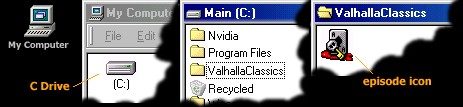
Open the My Computer icon from your desktop and
display the contents of your C drive, find the folder
called ValhallaClassics
and open it. Inside you
will see the
 I have run the setup program but now what
 When running an episodes
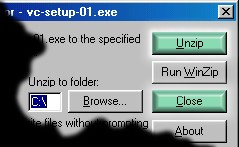
  setup program, you should
click the Unzip button. This will create a folder
called ValhallaClassics on your C drive and install the
episode inside. You can now Close
the setup program
setup program, you should
click the Unzip button. This will create a folder
called ValhallaClassics on your C drive and install the
episode inside. You can now Close
the setup program
 episode icon, simply run this to play the episode.
You can (if desired) drag the episode icon
to your desktop which will create a shortcut, making
it easier to run the episode in the future
episode icon, simply run this to play the episode.
You can (if desired) drag the episode icon
to your desktop which will create a shortcut, making
it easier to run the episode in the future